My Process
When creating e-learning courses, I always start with the learner in mind. My goal is to make the content easily digestible and displayed so the learner fully engages with it.
Zom-B-Gone Shelters Storyline
Problem: Surviving the zombie apocalypse.
Solution: Storyline course centered around training people how to use zombie shelters effectively.
Software Used: Storyline360
Huge shoutout to Tim Slade and his eLearning Challenges! When I saw this challenge on his website, I knew it was one I wanted to participate in and try new things with. This was such a fun project to develop because the theme was outside the box and different from what I normally create. It gave me an opportunity to make something with a lot of humor and outlandish situations.
I knew I wanted to build this entire course using Storyline 360 due to the interactions, the inclusion of audio/voiceover, and the graphics I wanted to use. I started by thinking about the learning objectives I wanted to include and how I could tell a story to achieve them.
Once I came up with the learning objectives, I decided I wanted the format to feel like on-demand training someone might receive from a fictional company. I also wanted to incorporate a storytelling aspect, so I created the first few slides showing zombies traveling from underground all the way to someone’s house. I found royalty-free sound effects and used Storyline’s AI text-to-speech to create a voiceover with a high-quality narrator.
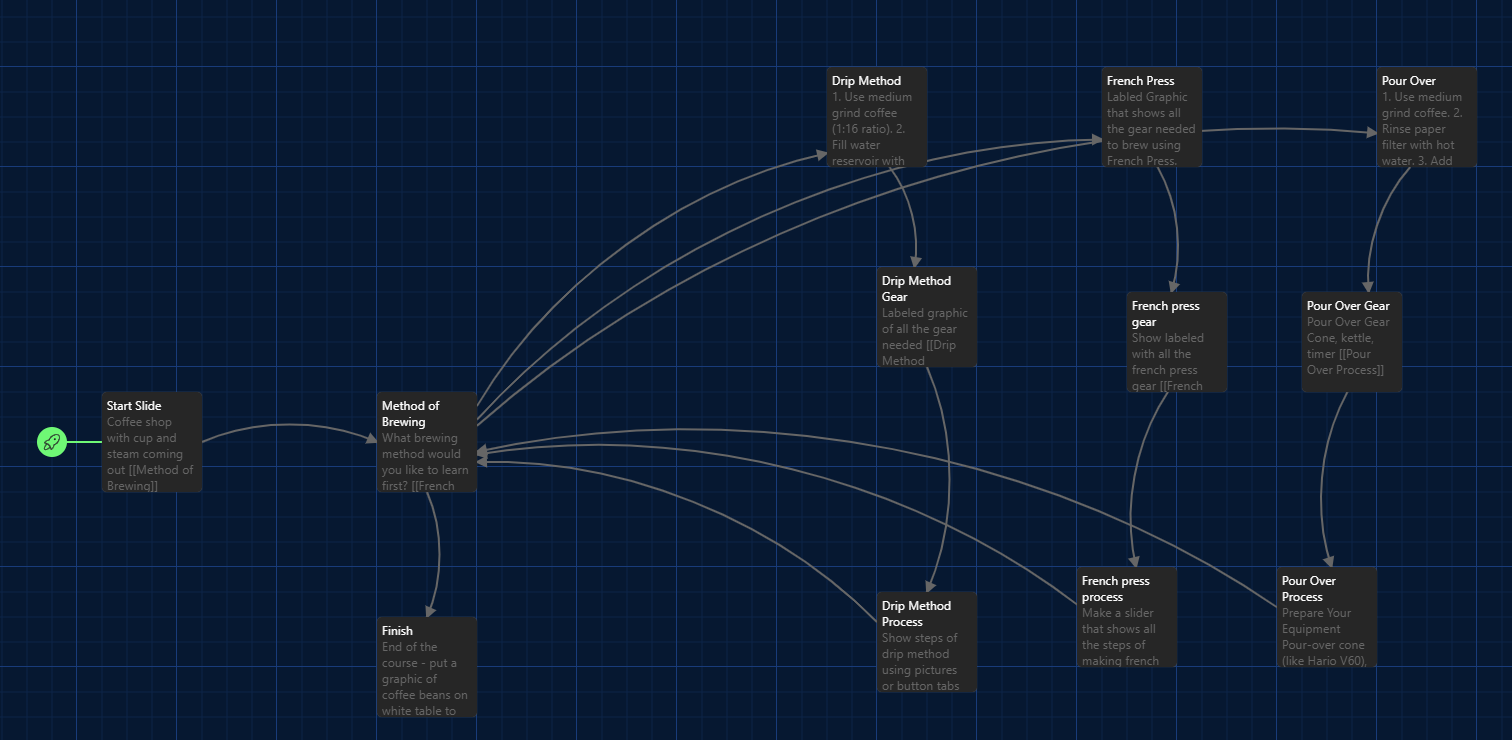
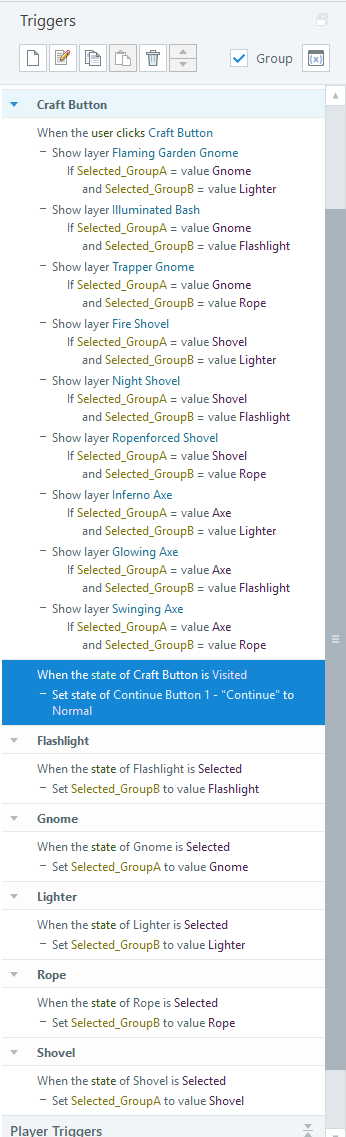
After completing the introduction and story aspect, I focused on coming up with humorous situations and information that supported my learning objectives. The training strikes a good balance between watching and listening to the training and interacting with it—clicking through and completing drag-and-drop activities toward the end. The crafting table was incredibly fun and allowed me to use a lot of variables. See screenshot below for details on that!
The knowledge check at the end allows learners to pass and earn “Zombie Survivor” status for completing the training. I’m looking forward to completing more of Tim’s eLearning Challenges in the future—they’re a great way to keep my creativity flowing and elevate my skills!
Tennis Storyline
Problem: Lack of understanding regarding basic rules of tennis and the scoring.
Solution: Fun-themed training that covers the very basics of tennis in terms of what is in/out and how the scoring works, since that is one of the most confusing aspects of the sports.
Software Used: Storyline360, Adobe Express, Canva, Twine, JavaScript, ChatGPT.
I came up with the idea for this training because I coached tennis prior to getting into instructional design and I wanted to take something that I used to do in-person and create an e-learning for it.
This was a really fun project for me since I didn’t have to do a ton of research and could act as the SME for the course. I knew I wanted the course to be completely in Storyline360 so I could leverage interactions and make the course feel a bit more fun for the learner. I decided to use bright green and yellow as my theme colors to really give it that tennis feel as well.
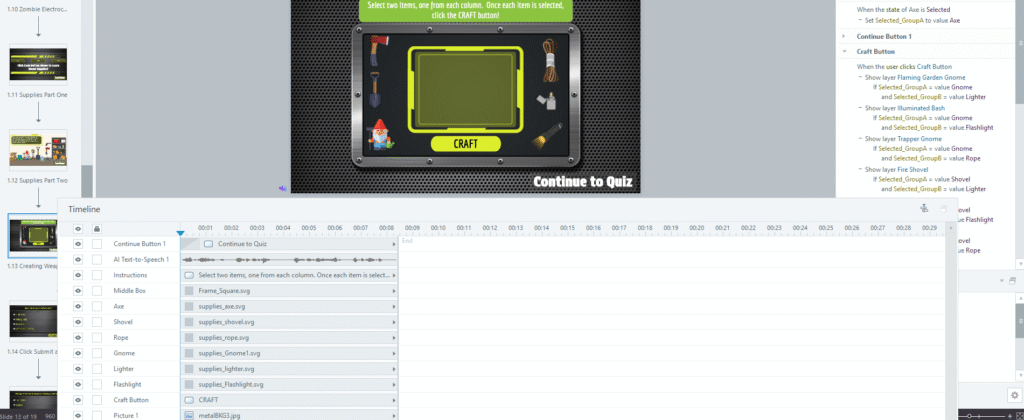
I used Twine again for this project, plotting out each slide and the order I wanted to put the slides/layers in. I knew that this course wasn’t going to be an all-encompassing rules guide to tennis, but rather a short, fun introduction to the court and scoring aspects. Those are typically the hardest parts of the sport, and that’s what I wanted to focus on.
The most fun I had with this build and the part that I think is most learner-centered is the scoreboard interaction. I used JavaScript/HTML/CSS to build the scoreboard, which gave me the ability to have the score react to the two buttons being pressed for a player scoring a point. This gives the learner both a fun interaction, and the ability to see the points in a game progress as they see fit.
Coffee Storyline
Problem: Struggling with making quality coffee at home.
Solution: Microlearning centered around three methods of brewing coffee, simplified for a quick resource and aimed at those more unfamiliar in this space.
Software Used: Storyline360, Adobe Express, Canva, Twine, ChatGPT.
The coffee e-learning that I created in Storyline360 came to fruition after I realized I was terrible at making coffee at home. I decided to solve that problem through a training, since it wasn’t possible I was the only person having this issue.
I began by researching different types of coffee and brewing methods and then realized that the amount of information on brewing a cup of coffee could fill libraries. So, I decided to narrow that down to just three methods and create something simpler and more of a microlearning experience that someone could easily go through and learn a thing or two about brewing a great cup of coffee at home.
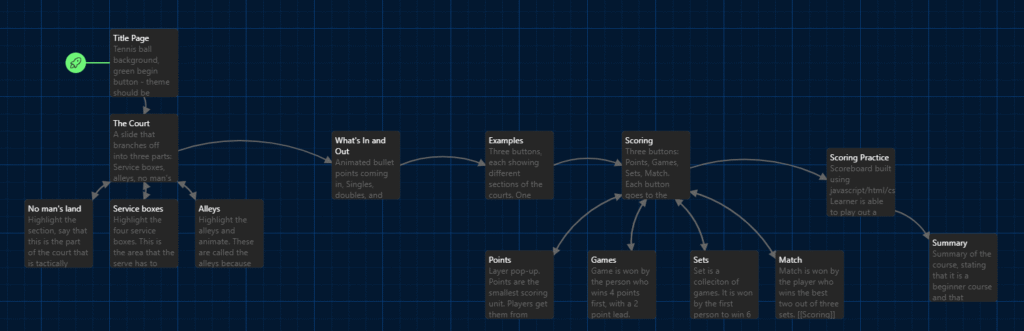
I began with storyboarding and branching out different slides/scenes in Twine so I could keep everything organized and make the build phase faster. From here, I needed to find stock photos for each the brewing processes and background images. This was fairly time consuming, as I wanted to find high quality images but also ones that allowed for me to add some interactivity within Storyline.
Creating the labeled graphics, slider interactions, and drag and drop were the most technical parts of this build, but after creating one of the brewing branches all the way through, the remaining paths were quicker.